We built the same three test scenarios in Flutter and React Native to answer a practical question: with React Native’s New Architecture enabled, where does each framework spend more time and resources? The details below show how we tested that question and where the results split.
This is a shorter reading of the original Zero One Group study, which I worked on with Muhammad Rijalul Kahfi, Dyva Pandhu, Muhammad Widodo, and Johan Sutrisno. The benchmark apps and test flows are public.
What we measured
The apps covered a lazily loaded list of 10,000 items; a grid with 100 animated tiles; and rapid taps and dragging while animations ran. We compared CPU use, memory, and frames per second during those tasks, then measured cold startup and release app size separately. The React Native app used the New Architecture with Expo SDK 52 and React Native 0.76.7.
We ran release builds on a Samsung Galaxy A14 and an iPhone 8, using Android Studio Profiler and Xcode Instruments. Interaction and profiling were manual because automation added overhead or could not run the same release-mode flow on both physical devices. We repeated runs and averaged the results. These are observations from two phones and specific implementations, not a general ranking of every Flutter and React Native app.
Startup and build size split by platform
| Measure | Flutter | React Native |
|---|---|---|
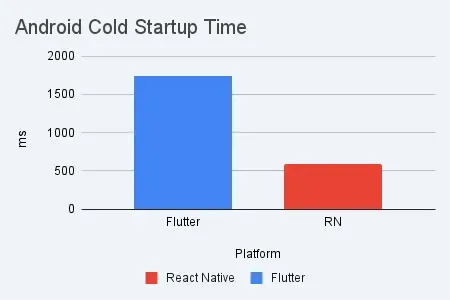
| Android cold start | 1,738 ms | 593 ms |
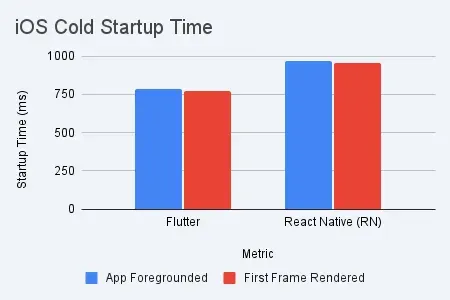
| iOS cold start | 771.8 ms | 953.4 ms |
| Android APK | 19 MB | 76 MB |
| iOS IPA | 10.5 MB | 7.3 MB |
In this test, React Native reached the Android first screen about 1.1 seconds sooner, while Flutter started about 0.18 seconds sooner on iOS. Flutter’s Android package was much smaller; React Native’s iOS package was smaller. A framework choice based on startup or build size therefore needs to account for the target platform.
What happened during the three workloads
- Long list: On iOS, Flutter rendered about 56 FPS against React Native’s 31. The Android charts show roughly 6% CPU and 150 MB total memory for Flutter, versus 19% and 195 MB for React Native.
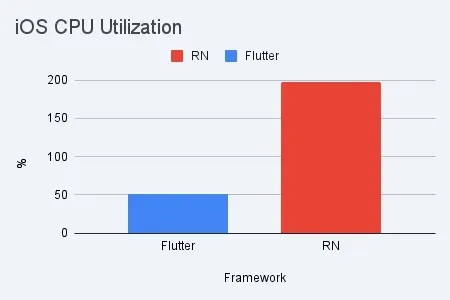
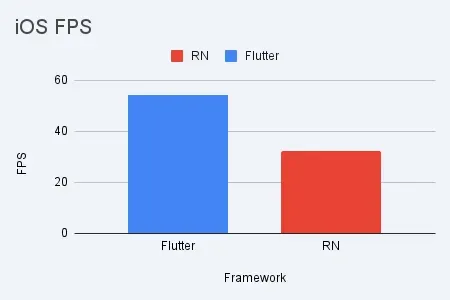
- Animated grid: iOS frame rate was about 54 FPS for Flutter and 32 for React Native. The CPU chart puts Flutter near 50% and React Native near 195%. Xcode can report more than 100% when an app uses multiple cores. On Android, total memory was roughly 178 MB versus 233 MB, again favoring Flutter.
- Rapid interaction: The iOS frame-rate gap narrowed to about 56 versus 51 FPS. Flutter still used less CPU in the charts. Android total memory was roughly 150 MB for Flutter and 200 MB for React Native.
The charts separate total memory from allocated memory. They should not be treated as interchangeable measurements. We also left Android FPS out of the cross-framework takeaway because those readings need matching refresh-rate and profiler settings before they can support a fair comparison.
What the result can and cannot tell us
For these builds and devices, Flutter was the steadier choice under sustained visual work. With the New Architecture enabled, React Native used more CPU and delivered lower iOS frame rates than Flutter in these workloads. We did not test React Native’s previous architecture, so this benchmark cannot measure how much the New Architecture improved it. React Native’s faster Android startup and smaller iOS package also show why a blanket “Flutter is faster” claim misses part of the result.
The test used one Android phone, one iPhone, manual interactions, and apps with different framework-specific libraries. The charts do not identify whether the React Native readings came from the plain Expo or Tamagui app in the public repository. The supplied results do not include a run count, variance, or confidence interval, so small differences should not drive a product decision on their own. I would repeat the test on the devices my users actually carry, with a fixed interaction script and repeatable timing, before choosing a framework for performance reasons.